
 Up to 84% Off VPN
When Crimson Desert launched, it did so without any form of difficulty options. While that meant the game had a set difficulty, overall it was received well, though towards the mid to late game, some players started to struggle with the harder boss fights. In late April, however, Pearly Abyss decided to step in and introduce three difficulty options to both make the game a little easier and a little harder, depending on how you want to experience the game.
In this guide, we'll explain how you can select these new options, alongside what they actually do.
How to Change Difficulty in Crimson Desert
There are no restrictions on switching; you can do it at any point during a playthrough, including mid-boss.
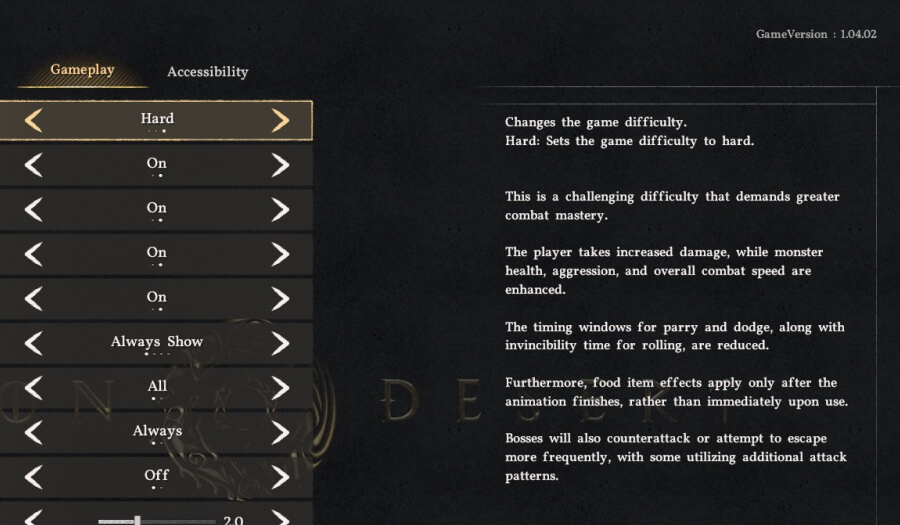
- Pause the game and navigate to the Others tab.
- Select Settings.
- Scroll to the Gameplay tab.
- The Game Difficulty selector is at the top of the screen.
- Switch between Easy, Normal, and Hard, then select Apply.
What Each Difficulty Changes
Easy
Easy reduces friction across the board, making every aspect of combat easier:
- Damage taken: Reduced from all sources.
- Enemy stats: Lower max health, aggressiveness, and movement speed.
- Parry and Dodge windows: Extended, giving you more frames to land a clean block or dodge.
- Boss counterattacks: Reduced frequency; bosses will break out of your combos far less often, letting you maintain offensive pressure more safely.
This is the right pick if you want to focus on the story, explore at your own pace, or get past a boss that has been a wall for a while.
Normal
Normal is the original launch experience and the baseline Pearl Abyss designed the game around. If you have been playing since March without adjusting anything, this is what you have been on the entire time.
Normal did receive some targeted adjustments in Patch 1.04.00 around boss behaviour and environmental damage, but it remains the intended middle ground.
Hard
Hard is a meaningful step up, not just a numbers bump. A few changes here rework how core mechanics feel entirely:
- Damage taken: Increased from all sources.
- Enemy stats: Higher max health, aggressiveness, and movement speed.
- Parry and Dodge windows: Reduced; less margin for error.
- Roll invincibility frames: Reduced, so mistimed rolls will get you hit rather than phasing through attacks.
- Boss counterattacks: High frequency; bosses will break out of your combos constantly.
- New boss patterns: Certain bosses gain additional attack moves that do not appear on Normal or Easy.
- Healing: Food effects only apply after the full eating animation completes; there is no mid-combo recovery.
Pro Tip: There are no potions in Crimson Desert, so the healing change on Hard is the most impactful and will completely change how you approach bosses in particular.
On Normal and Easy, health restores the moment you eat. On Hard, you have to commit to the full animation, which means poor positioning during a heal can get you killed. It turns every boss fight into a much more calculated experience.
Quick Comparison
| Easy | Normal | Hard | |
| Player Damage Taken | Reduced | Standard | Increased |
| Enemy HP and Speed | Reduced | Standard | Increased |
| Parry and Dodge window | Extended | Standard | Reduced |
| i-frames on Roll/dodge | Standard | Standard | Reduced |
| Boss counterattack frequency | Low | Standard | Increased |
| Extras Boss attacks | No | No | Yes (not all bosses) |
| Healing from Food | Instant | Instant | After animation |
Which Difficulty Should You Pick?
Easy: Best for story-focused players, anyone returning after a long break, or if a specific boss has become a wall. The story and exploration hold up regardless of the combat settings.
Normal: Where most players should start. It is the experience the game was designed around, and the challenge is fair without requiring deep mechanical knowledge to enjoy.
Hard: Best suited for players who have already cleared the game and want a second run with real stakes, or anyone who found Normal too comfortable early on. The healing change alone makes this a genuinely different game.
Since there are no consequences for switching, the safest approach is to start on Normal and adjust as you go. If a fight stops being fun, drop to Easy, clear it, and switch back. Nothing is stopping you.
Other Patch 1.04.00 Highlights
Difficulty settings were the headline addition, but the patch included several other changes worth knowing about:
- New storage items (Sturdy Gatherables Chest, Kuku Coolers): ingredients stored here can be used for cooking and crafting directly, without moving them to your active inventory first.
- Housing overhaul: multiple room layout options and improved furniture controls, including bulk retrieval.
- Item Lock function: prevents accidentally selling or discarding a selected item.
- New skills for key playable characters and improvements to certain attack flows.
- 13 new tattoos added for character customisation.
- Abyss Heuklang: pet is now tameable.
- Boss rematches: Pearl Abyss confirmed this feature is in development, but it was not included in Patch 1.04.00.