


Interface
The inbuilt UI elements are very basic at the moment. The raid frames are very similar to the previous default raid frames. They made the default dispel indicator have a gradient, they changed the heal absorb texture, and they added a feature that shows defensive cooldowns on someone’s raid frame.
There is also a new feature that allows healers to assign visual alerts to specific group buff spells directly through the Group Buff Filter UI. Buff and debuff icons displayed on raid and party frames can now also have independent sizes and border scales, providing greater flexibility for customizing your UI.
The default Blizzard raid frames are already solid and more than sufficient if you prefer to keep things simple,however, if you want to take your UI and gameplay to the next level by taking advantage of the additional features offered by some addons, here are my recommendations:
- Method Raid Tools: A helpful add-on for raiders, especially for raid leaders and officers, it provides essential raid utilities that the default UI may lack, such as notes, fight logs, organization tools, and more.
- EllesmereUI: A lightweight, highly customizable alternative to ElvUI, The add-on is designed to be modular, so you don't necessarily have to use every component. It's also designed to give players a clean, modern, and highly tailored interface without the bloat or complexity that often comes with other addons.
- DandersFrames: DandersFrames is a fully customizable party and raid frame add-on, perfect if you're looking for more flexibility than the default frames provide.
- EnhanceQoL: A lightweight, modular collection of 100+ quality of life fixes and UI polish for WoW.
- OPie: provides a highly customizable radial menu for quickly accessing spells, items, mounts, toys, and macros. It’s especially useful for streamlining abilities and reducing clutter on your action bars.
- Plater: for nameplates, Plater is returning and already has a version where you can import your live profile. The majority of the relevant tools that plater is used for will be retained, most notably colored nameplates.
- Platynator: a good new nameplate add-on with an easy-to-use customization UI.
An interface is extremely personal, but I highly recommend enabling the new features that come with the midnight expansion:
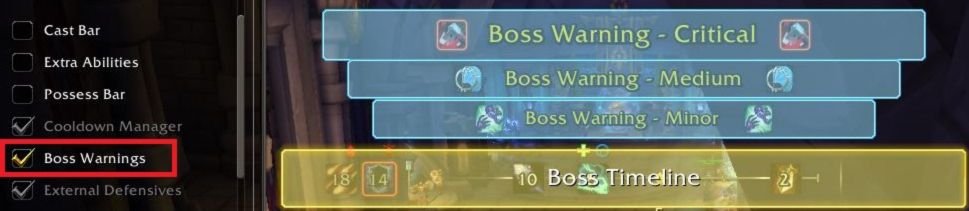
Enabling Boss Warnings & Boss Ability Timers
You can enable this feature through Options => Gameplay enhancements, or through the Edit Mode.

Enabling the Cooldown Manager
You can enable this feature through Options => Gameplay enhancements
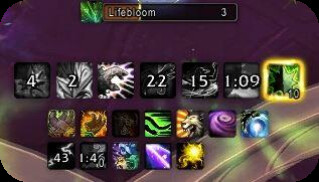
With WeakAuras no longer available, we’ve lost the ability to create fully custom interfaces in the middle of the screen or set up class-specific HUDs to track all the information we need. To address this, Blizzard introduced the Cooldowns Manager, which provides a solid, built-in alternative.
Although it’s more limited than WeakAuras, the Cooldowns Manager still offers basic customization. You can drag and drop abilities into tracked or untracked areas, making setup simple and intuitive.
As of 12.1.0 you can also track items such as consumables, trinkets, or potions and track racial ability cooldowns and durations.
Overall, the current version is a significant improvement over its initial release in patch 11.1.5, offering an easy-to-use system that helps you stay on top of your abilities without the complexity of external add-ons.
Enabling the Damage Meter
The new built-in Damage/Healing meter generally consumes fewer resources compared to the Details addon, since all meter calculations are handled server-side.
You can enable the damage meter through Options => Gameplay enhancements, or it can be enabled and positioned in Edit Mode, though if it still does not appear for you, try using this command to make it show:
/run DamageMeter:Show()
Enabling the Combat Audio Alerts
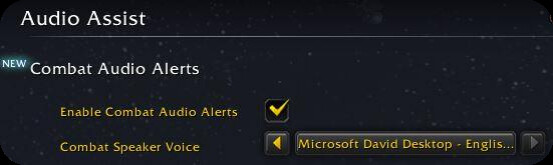
There is also the audio assist feature that has been made for accessibility. It is actually handy because there is a function that plays a sound (Text to speech) and other audio cues to announce important combat events out loud, helping players track what’s happening without relying on visual add-ons.
You can enable this feature through Options => Audio assist (under Accessibility tab)
Macros
In World of Warcraft, macros are in-game tools or custom scripts that let you combine commands, abilities, and items into a single button press. They allow you to sequence spells, create custom names and icons, cast different abilities based on whether your target is friendly or hostile, set targeting conditions, and much more. They help simplify gameplay, save time, and add flexibility.
Spell Mouseover Macro
All abilities can be used as a mouseover macro. The example below is a Rejuvenation mouseover macro. If you replace "Rejuvenation" with any ability name, it will cast the ability you have typed on the target your mouse is currently over.
#showtooltip
/cast [@mouseover,exists][] Rejuvenation
Since Dragonflight, the standard UI enables mouseover via an easy-to-access option. You can opt in or make your own macros if you prefer to customize them more.
Rejuvenation Mouseover Macro
Another example is a Rejuvenation mouseover macro, which will prio your mouseover, then your target (if friendly), and yourself (if you’re not targeting any friendly unit).
#showtooltip
/use [@mouseover,help,nodead][help,nodead][@player] Rejuvenation
Cast at Cursor Macro
You can also use a macro to cast an AoE-targeted ability directly at your cursor’s position without clicking its position. Here are two examples with Efflorescence and Ursol's Vortex.
Efflorescence Cursor Macro
#showtooltip
/cast [@cursor] Efflorescence
Ursol's Vortex Cursor Macro
#showtooltip
/cast [@cursor] Ursol's Vortex
Other Useful Macros
Nature’s Swiftness & Rebirth Macro
This macro will use Nature's Swiftness and then cast Rebirth instantly on your mouseover target (or your current target if you’re not mousing over anyone).
#showtooltip Rebirth
/cast Nature's Swiftness
/cast [@mouseover,help,nodead][help,nodead] Rebirth
Nature’s Swiftness & Regrowth Macro
Same idea, but for Regrowth with Nature's Swiftness.
#showtooltip Regrowth
/cast Nature's Swiftness
/cast [@mouseover,help,nodead][help,nodead] Regrowth
Cancel Form Macro
This macro allows you to instantly leave your current form.
/cancelform