

 Up to 84% Off VPN
Interface
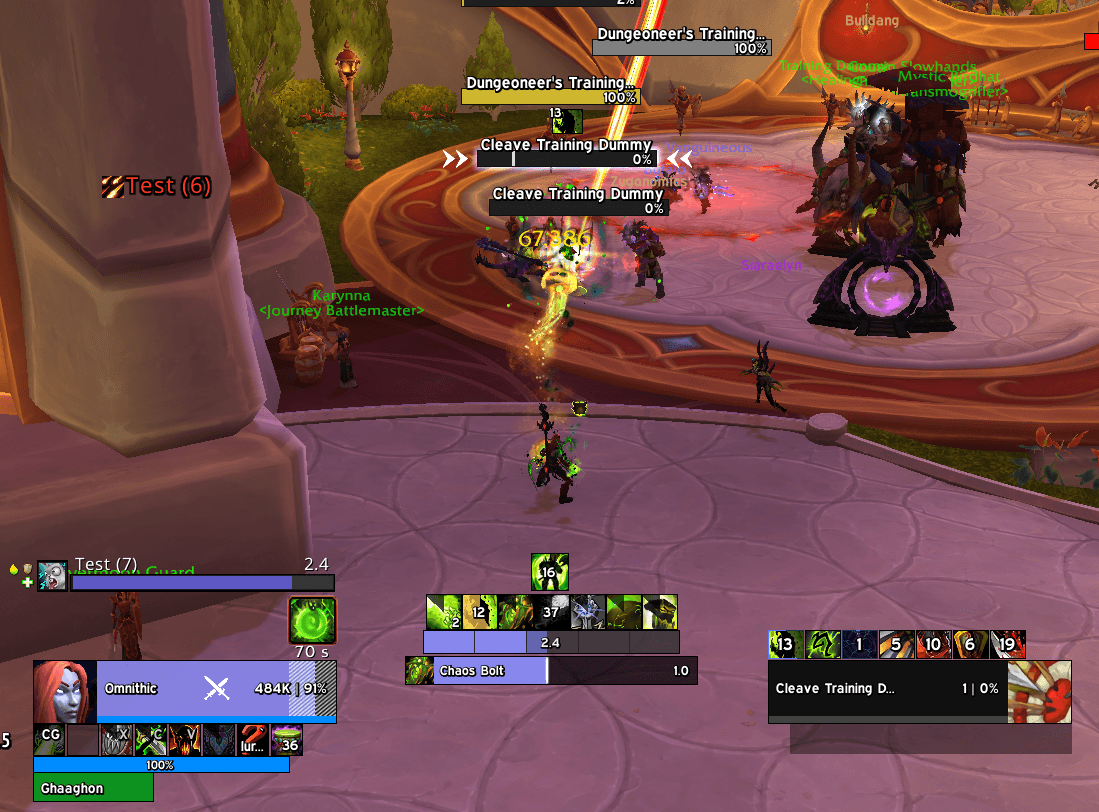
A proper UI for any player will usually try to center the information they need as much as possible. The goal here is to reduce how spread out the information is and you can maintain focus in as little of an area as possible.
User Interfaces can be quite personalized, but it is important to track the following elements in a Destruction UI for optimal play:
Soul Shards - Every Warlock needs a Soul Shard Bar, or a similar alternative. This is especially important for Destruction as we have fragments to our Soul Shards making it hard to keep track of when your spenders are usable.
Immolate - Always be tracking Immolate or Wither, as it is important to never let these drop - Especially Wither. The entire kit of Wither is designed around increasing the stack count and letting it tick down to do damage, and ensuring the debuff never falls off is crucial.
Fiendish Cruelty - Shadowburn is our strongest Soul Shard Spender, using procs of Fiendish Cruelty needs to happen quickly before you risk losing a proc.
Chaotic Inferno - This is not very impactful to our overall gameplay, but it is good to know when our Incinerate is going to be an instant cast. This will enable us to plan a little bit of movement in the event we receive the buff.
Malevolence - Specific for Hellcaller, it is important to cast as many Soul Shard Spenders as possible during Malevolence. Devil Fruit provides random procs of Malevolence, which gives us the opportunity to track when we’ve received a proc. This means we can better use Soul Shard spenders during these proc windows.
Diabolic Ritual - Knowing when your next Demonic Art becomes active and knowing what demon your next Demonic Art is summoning is essential to planning your damage output. This enables us to improve our Soul Shard management, plan ahead if we want to hold Ruination for an add spawn, or just simply be ready to cast another Soul Shard spender to get our next Diabolic Ritual to start counting down.
General UI
When creating a custom UI, there’s a few addons that can be recommended due to how much information they provide that aren’t easily obtainable or configurable in a default UI.
The following addons will usually provide at least one of the following 3 categories: Visual clarity, encounter utility, and combat assistance. Feel free to try them out and select whichever ones feel the best to use, as this boils down to personal preference.
AdvancedInterfaceOptions - Allows you to set up account-wide CVars.
SkironCooldownManager/BetterCooldownManager - Improves the customizability of the base Cooldown Manager and allows additional Item and Spell tracking.
Twintop’s Resource Bar - Improved resource bars for every class that has them, and for Destruction this tracks Soul Shards.
BigWigs and LittleWigs - Even if you use a default UI and download as little addons as possible, having a bossmod such as BigWigs and LittleWigs is the most important addon you can download. BigWigs is for raids, LittleWigs is for dungeons for when you do M+.
Method Raid Tools - This is a quality of life addon that can be used in all forms of content. This can help with reminders, setting groups, creating visual notes of boss environments, and other tools such as a marking bar.
Plater/Platynator - Improved Nameplates. Platynator skins the base Blizzard Nameplates and has an easy to use config. Plater allows for high customizability, but it can be difficult to set up a personal profile, though many profiles are publicly available.
TargetedSpells - Allows you to see spells targeting you. This is mainly useful for bolts, books, pistol shots and whatever else the mobs in M+ likes to throw at us.
BuffReminders - Includes Healthstone, Soulstone and Pet reminders alongside all raid buffs and consumables. It can also track Burning Rush!
MPlusTimer - An improved dungeon timer for M+.
Time Spiral Tracker - Not a mandatory AddOn, but it is nice to see a clear indicator when one of your Evokers grant you a free use of Demonic Circle: Teleport.
Northern Sky Raid Tools - Primarily for raid, this AddOn has been gaining a lot of traction in Midnight and a few raid encounters require Northern Sky Raid Tools to efficiently handle specific mechanics.
EllesmereUI - This is an “All-In-One” UI suite that has been gaining a lot of popularity lately, and can replace many of the addons listed above.
If you find it difficult downloading and managing so many different AddOns, I recommend downloading EllesmereUI to try and alleviate that load. Even if you download EllesmereUI, you will still want to download additional addons such as BigWigs, LittleWigs, Method Raid Tools, and Northern Sky Raid Tools.
Macros
There are some useful macros for Destruction Warlocks, such as cursor location macros, mouseover macros and specifically for Warlock, Soulburn Macros.
Soulburn Macros
The following macros make it easier to use Soulburn, where you will never have to worry about casting Soulburn before. Just ensure you have the Soul Shard that Soulburn requires.
Demonic Healthstone Macro
#showtooltip
/cast Soulburn
/use Demonic Healthstone
Demonic Gateway Macro
#showtooltip Demonic Gateway
/cast Soulburn
/cast [@cursor] Demonic Gateway
Drain Life Macro
#showtooltip Drain Life
/cast Soulburn
/cast Drain Life
Cursor Macros
Some useful macros for Destruction Warlocks are cursor location macros which cast the spell at the location your cursor is when you press the spell.
Summon Infernal Macro
#showtooltip
/cast [@cursor] Summon Infernal
Shadowfury Macro
#showtooltip
/cast [@cursor] Shadowfury
Cataclysm Cursor Macro
#showtooltip
/cast [@cursor] Cataclysm
Rain of Fire Cursor Macro
#showtooltip
/cast [@cursor] Rain of Fire
Mouseover Macros
These macros are useful when you want to keep hitting and targeting your main target, but cast another spell at another target. This is powerful when mousing over the boss frames or the other nameplates of the secondary targets in question.
Havoc Mouseover Macro
#showtooltip Havoc
/cast [mouseover,harm] Havoc; [harm] Havoc
Havoc Focus Macro
#showtooltip Havoc
/cast [target=focus] Havoc
Soulstone Mouseover Macro
#showtooltip
/use [target=mouseover] Soulstone
Spell Lock Focus Macro
#showtooltip
/cast [target=focus] Spell Lock
Curse of Tongues Mouseover Macro
#showtooltip
/cast [target=mouseover] Curse of Tongues
Curse of Exhaustion Mouseover Macro
#showtooltip
/cast [target=mouseover] Curse of Exhaustion