

 Up to 84% Off VPN

Interface
User Interface is incredibly important for players. Although Retribution is a DPS build, it is also a hybrid build with powerful tools such as Blessing Of Protection and Cleanse.
When watching high performers play any version of WoW, you'll often notice similarities in their custom UIs. The common theme is that everything important is centralized in the middle of the screen. This is done for three reasons:
- Create minimal eye movement
- Create minimal mouse movement
- Eliminate clutter around our screen
As a Hybrid DPS, you will want to have your raid frames close to the center of your screen to use your utility to assist your raid/party. It is most beneficial for yourself and your team to do so.
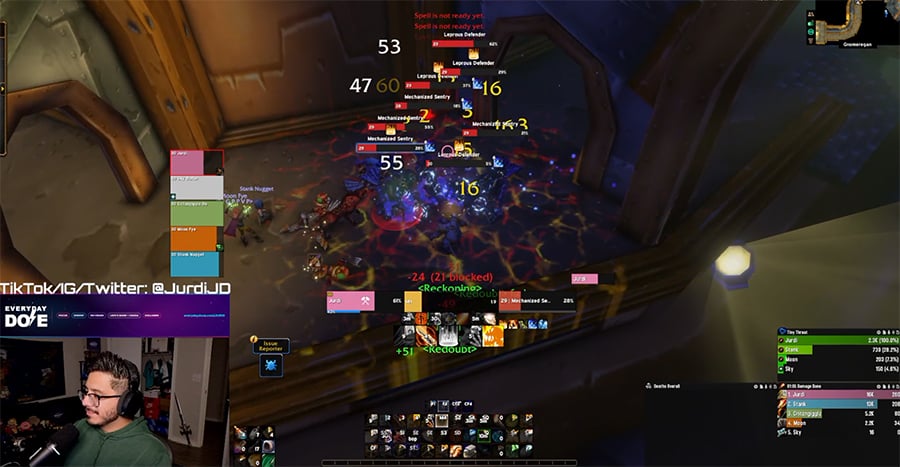
Addons
Ellesmere UI
Ellesmere UI is a full UI addon that allows you to customize your UI. The picture used in the Interface section is using Ellesmere UI. Players have the option to turn off certain UI portions, such as Nameplates, Bags, Action Bars, etc, should they want to use other addons instead for those specific systems. Other popular UI addons also include ElvUI and ShadowedUI.
Details
Details is a damage-meter addon that we recommend over the built in damage-meter from Blizzard for a few reasons. The primary reason is that Details also comes with a Threat-meter extension through Tiny Threat, which is a non-negotiable not only for tanks, but for all DPS so they can see where they are in case they are close to pulling threat!
You can also open more windows to see other combatlogs such as Deaths, Interrupts, Dispels, etc, to see if other players are doing their job correctly!
ForeverAuras
WeakAuras looks to be retiring potentially for good from World of Warcraft, with WoW: Forever now adopting Modern World of Warcrafts API restrictions.
However, popular WoW Classic Addon and WeakAura developer Fojji is looking to potentially bring a new version of WeakAuras to WoW Forever: ForeverAuras. Fojji is known for his WeakAura packs for raids, and should he be successful in creating ForeverAuras, then we will add those auras to this guide as well.
Macros
Mouseover Macros
Mouseover Macros allows the Paladin to cast their utility spells on a player without having to click on that players party/raid portrait. Simply hover over their character or raid frame, and when you cast the keybind, it will cast it on that player.
In WoW: Forever, you can actually opt out of Mouseover macros for self/mouseover separate keybinds in settings, but for those who prefer macros, this is an option as well. Having your frames close to the center with mouseover macros helps use that utility faster.
Blessing of Protection
#showtooltip Blessing of Protection
/cast [@mouseover,help][] Blessing of Protection
Blessing of Freedom
#showtooltip Blessing of Freedom
/cast [@mouseover,help][] Blessing of Freedom
Cleanse
#showtooltip Cleanse
/cast [@mouseover,help][] Cleanse
Target Dummy BoP
Target Dummies are great to alleviate threat from a situation where you see an emergency coming in. The Paladin, even a DPS or Holy Paladin, has an additional aspect to the target dummy, that is casting Blessing Of Protection on it while it’s active. What does this do? It allows the target dummy to hold not only 1 target, but MULTIPLE targets while being immune to all physical damage for 10 seconds.
The following macro can be used to cast the target dummy and then cast BoP on it. You must hit this macro twice and not have a GCD timer for it to work:
#showtooltip Advanced Target Dummy
/use [@cursor] Advanced Target Dummy
/cleartarget
/target Advanced Target Dummy
/stopmacro [noexists][dead]
/cast [@target] Blessing of Protection